Thursday, April 29, 2010

Thursday, April 15, 2010
Vimeo: Video Hosting Site

Sunday, December 20, 2009
60 Second Recap: Like Cliff Notes, but in Video Format!

What is 60 Second Recap? According to the site, they want to "help teens (yes, teens of all ages!) engage with literature. We want to help them see it not as some chore to be endured, but as -- dare we say it? -- the gift of a lifetime. How? Through the language of our time -- the language of video. Video that's focused, engaging, informative ... and short enough to hold just about anyone's attention."
Users will find videos on major works of literature here broken down by chapter, in 60 second increments. Need an overview? They have it in 60 seconds. Need chapter one? They have it in 60 seconds. You get the idea. Novels such as Fahrenheit 451, Of Mice and Men, Animal Farm, Jane Eyre, Lord of the Flies, and Hamlet are featured.
In addition, the site also gives students tips on how to write papers so as "not to bore your teachers". That's something everyone can appreciate!
As of right now, the site is free. You can sign in if you want to post a question or leave a comment, but if you just want to view the videos, it's free. I hope that it stays that way...
Flip Video Camera: Converting File Formats

Friday, June 26, 2009
I'm Quoted on Common Craft's Site
http://www.commoncraft.com/files/video_factsheet/Fact_Sheet_Twitter_Search.pdf
Having said this, I highly recommend using Common Craft videos to help explain technology tools to other people. Enjoy!
Wednesday, May 13, 2009
Teachers: Be Very Afraid

- "Each year a selection of ingenious students - from primary to university age - are invited along to BAFTA in London's Piccadilly to show and talk about the extraordinary things they are doing with new technologies in their learning. During the day the students explain just what it is that they are doing. Each year is more ambitious; each year poses real questions for policymakers and parents as the ambitions of these 21st century learners, together with their ability to deliver on these ambitions, becomes apparent."
- Students from elementary school through college using technology
- Special needs students using technology (learning disabled, autistic, and MR)
- Movie Maker for student made videos
- Google Sketch Up for building design
- Cell Phones in education
- Satellite technology
- Clay animation
- Web Design in Flash, Director, Dream Weaver
- Gaming in education
- Pocket PCs
And this was just the first page!!
Is there really any argument for not using technology in the classroom? I think not.
Monday, May 11, 2009
"Web 3.0" by Kevin Kelly
If YouTube is blocked at your school, copy and paste this video link and view it at home:
http://www.youtube.com/watch?v=J132shgIiuY
Animal Web Cams
Animal Cams at the Smithsonian National Zoo
This page from the National Zoo has many cams to choose from including: gorilla, lion, panda, octopus, tamarin, leopard, flamingo, and more! One of my friends told me about this site, and now I can share it with you!
Monterey Bay Aquarium Web Cams
Monterey's site includes cams that feature otters, a kelp forest, penguins, and a live view of the bay underwater.
Biodiversity Research Institute's Eagle Cam
This is one of my favorites. You can choose to go to this page and watch 15 second updates, or you can click the preview window to see a live feed (recommended). I used this site with my class and we were able to watch a pair of bald eagles feed their babies!
RELATED POSTS:
SnagFilms
Biology Resources for Teachers
Food Chain Games
Make a Wild Animal
Way Cool Science Sites
Science Videos on Vimeo
Tuesday, April 14, 2009
Discovery Education Goes Green
Teachers: check out the teacher resource section where you can find lesson plans on recycling, renewable energy, electronics recycling, composting, landfills, and the 4 R's: reduce, reuse, recycle, and recover. Teachers will also find teaching activities, video assets, worksheets, puzzles, and more powered by Discovery Education.
Students: search the student site for puzzles, videos, and interactive activities that bring them closer to the world around us.
Friday, April 10, 2009
The World Wide Web in Plain English
This is a YouTube video found at http://www.youtube.com/watch?v=wZoMbBzqxyc
Related Post:
Wiki in Plain English
RSS in Plain English
Thursday, April 2, 2009
SnagFilms Film Widget
SnagFilms allows you to place documentary widgets on your blog or social networking site. The one I have embedded into my blog is about Great White Sharks. The movies are shorter than the original ones that aired on National Geographic, but they are still high quality.
Pros:
You can link to documentaries using widgets on your blog.
Cons:
The widget links directly to the site itself and does not play within your blog.
The video will play 1-2 short commercials before the documentary that you cannot skip.
Biology Resources for Teachers

ARKive's mission is to bring together the best photographs and video footage of threatened species around the world in hopes of having a concise, organized database of these organisms. They partnered with some of the best wildlife photographers in the world so that teachers, students, and the general public may learn more about these threatened species and act to save them. You can search for species by their classification (mammal, amphibian, insect, plant, etc), and each threatened species you click on provides detailed information about that species.
There is also an educator section of ARKive, which I was pleasantly surprised to see has FREE multimedia resources on topics such as: plant life cycles, adaptations, food chains and webs, habitats, ecosystems, predator and prey, natural selection, and much more. The resources are PowerPoint presentations with embedded videos on the topic. This is truly a worthwhile site!

Biology in Motion is is a site dedicated to providing short animations to explain biology concepts such as: enzyme characteristics and intestinal gas. In addition, there are several interactive activities and simulations that give students practice with concepts like: Meiosis, Mitosis, evolution, digestion, enery, cell division, and the cardiovascular system. While this site is not as extensive as ARKive, it is a helpful supplemental site if you are teaching one of these concepts.
Tuesday, March 31, 2009
"Shift Happens": Remixed and Updated Again
Monday, February 9, 2009
Movie Maker Quick Tip: Taking a Still Picture from a Video

RELATED POSTS:
Sunday, February 8, 2009
Quick Tip: Importing Videos into Movie Maker

RELATED POST:
Muting the Audio in Movie Maker
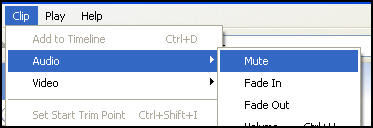
Quick Tip: Muting a Video Segment in Movie Maker
Saturday, January 10, 2009
The History of the Internet
History of the Internet from PICOL on Vimeo.
Sunday, January 4, 2009
More Contests for Teachers and Students
Are you a high school teacher? Encourage your students to apply for the BrainyFlix Vocabulary Video Contest! The contest, sponsored by the Alumni Association, wants to help students learn SAT vocabulary words by posting vocabulary videos made by students. The video that receives the most votes in the contest will receive $600 in prize money. $200 goes to the creator of the video and $400 goes to the class or school club of his/her choice. The site will also give out one free download from iTunes for every five videos that are submitted (for the first 1,000 videos uploaded to the site). Deadline: March 16, 2009. See example video entry hosted on YouTube:
Science Videos on Vimeo
3A Teeth Video from Simple Science on Vimeo.
Monday, December 29, 2008
Using Movie Maker in the Classroom

Windows Movie Maker is free video-editing software included with Microsoft Windows XP. With Movie Maker, you can turn footage from your digital video camera into movies, share them on the Internet, and burn them to CD or DVD. Downloadable movies from online sources such as Discovery Streaming can also be edited using this software, just be sure you use a clip that has been flagged for “editing“.
Where can you go to download Movie Maker for your home computer? (Remember, you need to have Windows XP or higher.) Follow the link: http://www.microsoft.com/windowsxp/downloads/updates/moviemaker2.mspx
How can educators justify an educational activity like digital storytelling, which at first glance, seems an unlikely candidate for standards-based education? Ironically, the answer to this question can be found through a careful examination of a series of standards and position statements in the following article: TechLearning Article
Here are some additional resources you can use to become more proficient with Movie Maker:
1. Microsoft’s Movie Maker PageThis page contains various tutorials for the program and an explanation of the software.
2. Mighty Coach Tutorial on Movie Maker
3. Atomic Learning Tutorial on Movie Maker
Classroom Ideas for Movie Maker and/or using your Flip Video Camera:
- Edit Discovery Streaming videos to show only section you want to your class
- Remix Discovery Streaming videos to put together important concepts
- Have students research historical figures. Record their interviews
- Create a public service announcement.
- Create a commercial for a new product
- Record a school tour or classroom tour for back to school night.
- Record puppet shows, theater performances, debates, or speeches
- Record science experiments
- Record weather daily or shadows from the sun throughout the year
- Go on a nature walk and record items from your “treasure hunt”
- Record when a student has a success or a school project
- Download editable videos to create your own movies in Movie Maker. Mute the narrator and record your own facts.
Related Articles:
1. MD, VA, DC Day of Discovery (Using Movie Maker in the Classroom)
2. Testing the New Flip Video Camera


 Posts
Posts


