Thursday, April 29, 2010

Word Magnets: Great for Promethean Board Vocab Activities!
 Word Magnets is a free resource where you can type in words and then move them around the page against different background templates. You can use this idea to create phonics activities, vocabulary and sight word practice, timelines, Venn Diagrams and more! When you get to the home page, click the big arrow at the bottom that says, "Use the resource". On the next screen where it advertises the upgrading to Word Magnets 2, wiggle your mouse and another arrow will appear that says, "Next". Finally, you will arrive at a text box where you can type or paste in a list of words that you want to move around the screen. Then click "next". In the example below, you can see I made a simple sorting activity with long vowel words and short vowel words.
 Here I made a sorting activity that would be appropriate for ELL or primary kids learning sight words. If you click on a color before you choose a word, the word will change to that color. Now you can visually differentiate words as well. There are several different template backgrounds to choose from: Venn Diagram, Webs, Timelines, Ordering, etc. Check it out!
Chemistry Education Digital Library
 The Chemistry Educational Digital Library is a wonderful resource to Chemistry teachers and students! There are 3 main areas on the site. First, there is a video archive of science videos where you can investigate what you are seeing and why it happens. Practice being a scientist! Then there is an interactive periodic table (see below.) While this is not my favorite interactive table that I have seen online, it's still another resource that may appeal to learners.
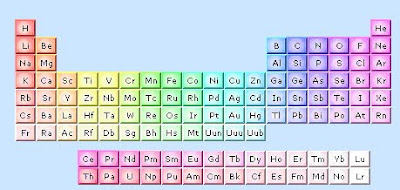 Finally, there is an area where you can view animated models of different common molecules.
 At the top of the page, click on Collections and Community for additional links and resources.
Related Post:
Conjugation.com - Perfect for ELL Classrooms
 Here is another great resource for ELL or ESL teachers. As anyone might know, conjugating verbs can be difficult when learning languages, especially in the English language. Conjugation.com is a website that will conjugate verbs in English for ELL learners. Type in your verb, and press "Conjugate". You will see a screen similar to the one below. Notice the tabs along the top of the screen. You can see the affirmative, negative, interrogative, definition, and examples of the verb.
For the tech geeks out there, you can also embed Conjugate.com into your teacher website or blog so you can have this feature built into your site! Cool! Thanks, Conjugate.com!
Wednesday, April 28, 2010
Sepia: Comparing Photos of Places from Then and Now
 Sepia Town is a website that allows you to compare historical photographs from selected major cities (see below).

Tuesday, April 27, 2010
Quick Translator Helpful for ELL Teachers

Quick Translation is a site that teachers with ELL students will find helpful, I'm sure. Copy and paste (or type) in the words that you want translated and then simply pull down the window to choose what language to auto detect. For example, if you wanted to paste in Spanish text, choose to have the site auto detect "Auto Detect Spanish to English". The site will then translate for you and check it against Google and Microsoft Translator. Two heads are better than one!
Google Maps: Use "Earth View" for 3D Maps
 Most people are familiar with Google Earth, but it seems as if the Google team has now integrated Google Earth features into Google Maps. When you click on Google Maps, you now have the option to click on "Earth View" to fly to different 3D maps. Once you click on "Earth View" a random list of 3D places will appear for you to fly to! Here I have flown to Reichstage, Germany. Notice the building is being viewed from the side, and I can see buildings behind it.
Subscribe to:
Posts (Atom)


 Posts
Posts


