Showing posts with label images. Show all posts

Sunday, August 16, 2009

Vi.sualize.us to bookmark images


Thanks to Hillary Andrlik's post on The Teaching Palette blog, I now have a favorite web 2.0 tool. Go to her post for a detailed description.


Basically, my new find thanks to Ms. Andrlik, is a site called Vi.sualize.us, which is similar to delicious.com. Vi.sualize.us lets the user bookmark and share images that you find on the web instead of websites. As Hillary mentions, this is great alternative to saving images on your computer and filling up its hard drive. I just signed up for an account and can't wait to try it. I'll post again later in the month when I have had time to review it.

Sunday, June 7, 2009

History in Pictures

The American Image: The Photographs of John Collier Jr. is a site where you can see how photographs have changed since the 1940s. Also users can create their own propaganda to study how propaganda is used in the public within this site.


Picturing the Century is sponsored by the National Archives and spans over 100 years in history. In addition to browsing the pictures online, you can order reprints from their catalog.


The Way We Worked: a site that documents in photographs how the workplace has changed since the 19th century. Pictures of how we worked, where we worked, what we wore to work, dangers at work, and more are displayed.


Life Magazine: Photographs show current issues as well as historical events.

Monday, February 9, 2009

Movie Maker Quick Tip: Taking a Still Picture from a Video

Are you frustrated that you can't find the perfect picture for your multimedia project but can find the image in a video segment in Discovery Streaming (United Streaming)? If you download the video and import it into Movie Maker, you can take a picture from the video! To do this, import the video. Drag it on the storyboard. Play the movie until you reach the frame that you want to take the picture of and pause it. Once the video is paused, you can click the button "Take Picture" on the lower right. Movie Maker takes a picture from the video, saves it automatically in "My Pictures" and imports it into Movie Maker all at the same time. Sweet! So if you can't find the images you want, make your own!

RELATED POSTS:

Muting the Audio in Movie Maker

Importing Videos into Movie Maker

Sunday, February 8, 2009

Quick Tip: Converting Slides to .JPEGs in PowerPoint

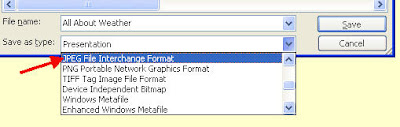
Did you know you can save your PowerPoint slides as .jpegs instead of a PowerPoint presentation? Why would you want to do this? Well, you would be able to import your slides into Photo Story and Movie Maker since both programs accept images. Keep in mind when you turn your PowerPoint slide into a .jpeg, you lose all functionality of the slide (No effects, transitions, or animations are saved). Essentially, you are taking a picture of your PowerPoint slide. To do this, create your PowerPoint slide. Go to "File" --"Save As". At the bottom of the window where it says "Save as Type", pull down the window and choose "JPEG File Interchange Format". Now you can import the .jpeg into any program that supports picture files.


Related Post:

Monday, January 19, 2009

Image Blender Software by Tech4Learning

Image Blender is one of many programs offered through Tech4Learning. Image Blender is a digital photo editor that allows you to combine layers and different photos, text objects, shapes, and special effects to create new images. By utilizing their "cool word" feature, students can place an image in the background and type text over it. The result is the image shows through the text, creating a "cool word" (see example in slideshow). Cool words would be great for visual learners studying vocabulary. For example, if a child is learning the differences between sedimentary, igneous, and metamorphic rock, why not put images behind the vocab words to help the student make a visual connection?

Teachers who work on their school yearbook also find Image Blender helpful for editing pictures and creating interesting effects before publication.
BubbleShare: Share photos - Easy Photo Sharing

Wednesday, December 31, 2008

FotoViewr: Embed your Flickr photos into your blog!

FotoViewr is a cool new site that I came across today that allows you to access your photos from your Flickr or SmugMug account, create a slideshow, and embed it into your blog or website. Why do I like FotoViewr?

  1. You don’t need to sign up or create an account to use the site.
  2. Easily access your photos by entering your username and the “tag” of the photos you wish to view.
  3. Pick a “gallery” tool to showcase your photos.
  4. Embed the slideshow using the code Fotoviewr provides for you. The transitions remind me of PicLens (otherwise known as Cool Iris), which is a new way to search for multimedia on the web. The effects are very similar to what I see in FotoViewr. If you can’t see the slideshow below, try viewing this blog in Firefox instead of Internet Explorer.

Monday, December 29, 2008

Pixlr: Online Photo Editor FREE!


Often teachers come to me and ask for a way to resize their pictures at school. Luckily, teachers have access to Image Blender, a photo editor by Tech4learning that allows them to do this, but they only have access to it in the computer lab unless they take advantage of "work-at-home" rights for this software. If teachers want to resize or edit digital pictures from the comfort of their own home or classroom, Pixlr is a great option for them.

There are several online photo editors. What makes Pixlr so special? It’s one of the only free photo editor that allows you to resize pictures in pixels. This is incredibly handy if you are trying to find a picture to fix exact pixel sizes for avatars or icons on websites. Pixlr was created for non-professionals and has many features including: resizing, cropping, layers, filters, etc. When you are finished with your picture, you have the option to save in JPG or PNG format.

Sunday, December 28, 2008

Kitzu offers multimedia options for teachers and students


Kitzu is my newest find! I mentioned it briefly in an earlier post, but I finally had a chance to look at it this weekend. Kitzu offers free, copyright-friendly, and educational media packages for teachers and students to use in multimedia projects. Most packages include about six pieces of media around an educational theme from the 21st century that can include images, documents, audio clips, video clips, and illustrations. As a teacher, download one of these kits to use with your whole class. You will be amazed that each student uses the media differently to create a unique project. For teachers who do not know where to start, Kitzu is the perfect first step for integrating with PowerPoint, Photo Story, Movie Maker, or Adobe Premier Elements.

Wednesday, December 10, 2008

National Geographic Photography


Check out National Geographic’s Photography gallery! For educators looking for math connections, look at the subcategory called “Patterns in Nature”. Real-life connections with patterning and symmetry can be used with these beautiful photos.

Help! I need digital images!


Many teachers struggle to find images that they are allowed to use without running into copyright trouble. Here are a few sites that I found over the past few months:
  1. Discovery Education Clip Art (Be sure to look at copyright. You can download about 10 of these images)
  2. Pics4Learning (Copyright friendly for teachers and students)
  3. Clip Art for Educators
  4. USA.Gov (read the disclaimer at the top of the page)