Are you on a budget? Can't afford to travel to places with your class? Consider using Street View in Google Maps to virtually explore areas you can't otherwise visit. While this feature is not yet available everywhere, I was surprised to see it offered as many places as it is. Street View allows you to move the little "Google Man" from the compass rose directly onto the map to get a view from street level. Real photographs are strung together to create a "walking tour". Look around the photograph, turn around, walk forward, or walk backward within this view. How do you do this? Navigate to Google Maps. Zoom in to the city of the area that you are interested in. (If you don't zoom in close enough, this won't work.) Click the Google Man and drag him onto the map. If the street you choose is not available in Street View, it will tell you.
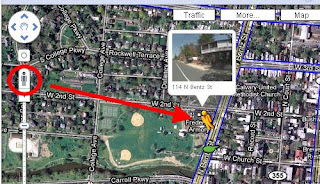
If the street is available, you will see a preview of the street above the Google Man's head. Drop him in place! When you are finished, click the little "X" in the upper right hand corner to exit this view.

 Sepia Town is a website that allows you to compare historical photographs from selected major cities (see below).

 Most people are familiar with Google Earth, but it seems as if the Google team has now integrated Google Earth features into Google Maps. When you click on Google Maps, you now have the option to click on "Earth View" to fly to different 3D maps. Once you click on "Earth View" a random list of 3D places will appear for you to fly to! Here I have flown to Reichstage, Germany. Notice the building is being viewed from the side, and I can see buildings behind it.


 Posts
Posts


